How Agentic Bench works
This page explains, at a high level, every part of an Agentic Bench run: what it is, what it does, and where it runs. You do not need to install or operate any of these parts yourself. Metrum AI Bench sets them up for each run and removes them afterwards.
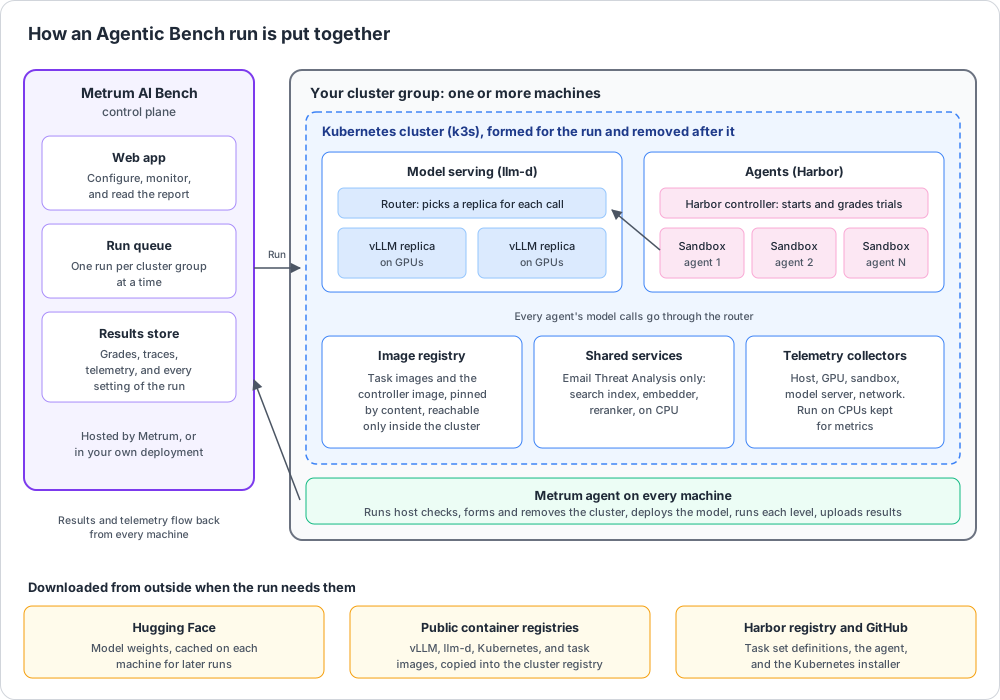
The components
| Component | What it is | What it does in a run |
|---|---|---|
| Metrum AI Bench control plane | The web app, its API, and its database. Hosted by Metrum, or installed in your own environment. | Holds your projects, queues runs, sends each run to your machines, and stores and shows the results. |
| Metrum agent | A small program installed on each of your machines when you onboard it. | Checks each machine, forms and removes the Kubernetes cluster, deploys the model, runs each level, and uploads results and telemetry. Machines never log in to each other. Each machine's agent does its own part. |
| Cluster group | A named set of your machines. | Decides which machines one run uses. One run uses one cluster group at a time. |
| Kubernetes (k3s) | A lightweight, standard Kubernetes distribution. | Joins the machines of the group into one cluster for the run. The first machine is the cluster head. The other machines join it. The cluster is removed when the run ends. |
| Cluster add-ons | Standard Kubernetes extensions: the NVIDIA or AMD GPU device plugin, the Gateway API and its inference extension, and LeaderWorkerSet. | Let Kubernetes schedule work onto GPUs, route model traffic, and run a model replica that spans several machines as one unit. |
| llm-d | An open-source system for serving models on Kubernetes. | Deploys the vLLM replicas and the router in front of them, so every agent calls one address. |
| Router | The llm-d gateway and its endpoint picker. | Sends each model call to the replica with the shortest queue and the most free KV cache memory. On a prefill and decode split, it sends each request through prefill, then decode. |
| vLLM | The open-source model server. | Runs the model on the GPUs, one copy per replica. It reads the agent's tool calls with the tool call parser of your model. |
| Harbor | An open-source framework for running and grading agents in sandboxes. | Its controller runs as one Kubernetes job per level. It creates the sandboxes, starts the agents, and runs the grader on each finished trial. |
| Sandbox | An isolated container. | Holds one agent's working environment for one trial: the task files and the tools the agent uses. Sandboxes are spread across all machines and deleted after each level. |
| Agent | The program that does the work. | The Coding Agent is Deep Agents, an open-source agent. The Enterprise Agent is the Metrum enterprise agent. Both call the model through the router. |
| Task sets | The work the agents do. | Terminal-Bench tasks come from the Harbor registry. Enterprise cases are stored by Metrum. |
| Image registry | A container image store that runs inside the cluster. | Holds the Harbor controller image, built inside the cluster, and every task image, copied in and pinned by content. Every machine runs exactly the same images. It is reachable only from inside the cluster. |
| Shared services | Services the Enterprise agents call. | Email Threat Analysis starts a vector search index that holds the prior phishing campaigns, a text embedder, and a reranker, all on CPU. They restart before every level. Contract Review and Document Redaction start none. |
| Telemetry collectors | Small collectors on every machine. | Read host, GPU, sandbox, model server, and network counters during each level and send them to the control plane. They run on CPUs kept apart from the sandboxes. |
| Network switch readers | Optional. | When your network switches are registered in Metrum AI Bench, switch port counters are read for each level. See Network switches. |
What a run does on your machines
| When | What happens |
|---|---|
| Before the run | The Metrum agent on each machine waits until the clock is synchronized to within 0.5 seconds, and installs chrony with the system package manager when it is missing. It refuses a machine that already runs another Kubernetes cluster, and an NVIDIA machine without the NVIDIA Container Toolkit. A failed check stops the run, and the stage tracker shows the reason. |
| Setup | The agent installs a pinned version of k3s (v1.36.4+k3s1) and forms the cluster. Kubernetes add-ons, the image registry, llm-d, and vLLM are deployed. Each machine must report the GPUs the run asks for. |
| Model download | The model weights download from Hugging Face into a model cache on each machine, /var/lib/metrum/hf-home by default. The cache is kept after the run, so later runs of the same model skip the download. |
| Each level | The agent checks that every machine has the free disk the level's sandboxes need, measured on the run's earlier levels. Sandboxes are created, the agents work, the grader scores each trial, results are uploaded, and the level's sandboxes are deleted. |
| Teardown | The model server is stopped, and k3s is uninstalled from every machine. This releases the GPUs. |
| After the run | The machines hold no cluster. The files in the next table stay. The next run on the cluster group can start. |
What stays on a machine after a run
| What | Where | Size |
|---|---|---|
| Model cache | /var/lib/metrum/hf-home | The model weights. Later runs of the same model reuse them. |
| Python package cache for the sandboxes | /var/lib/metrum/package-cache | Up to 200 GB. Later runs reuse it. |
| chrony | Installed with the system package manager | Only when the machine had no chrony. |
| helm v3.16.2 | /usr/local/bin/helm | One program. |
| Telemetry and switch readings not yet uploaded | Under the agent's own directory, ~/.metrum/agent | Removed once uploaded. |
The free disk you plan for a run includes the package cache. See Hardware.
Teardown time. Removing the cluster takes longer after large levels, because every sandbox's storage is cleaned up. It takes about 6 minutes after a level of 1,200 sandboxes, and can take over an hour after 1,800 sandboxes. The next run on the same cluster group waits until teardown finishes.
The machines are reserved during a run. While a run holds a cluster group, its GPUs serve only that run. Other runs on the same group wait in the queue.
Network access
Between the machines of a cluster group
Allow all traffic between the machines of a cluster group. This is the setup Metrum tests. At a minimum, Kubernetes needs these ports open between the machines:
| Port | Direction | Used for |
|---|---|---|
| TCP 6443 | Every machine to the cluster head | Joining the cluster and talking to it. |
| UDP 8472 | Between all machines | The cluster's pod network. |
| TCP 10250 | Between all machines | Starting and watching containers on each machine. |
A prefill and decode split over RDMA runs its model servers on each machine's own network, so these ports must also be open between the machines:
| Port | Direction | Used for |
|---|---|---|
| TCP 8000 and 8200 | Between all machines | The prefill and decode model servers. |
| TCP 9000 and 9200 | Between all machines | The KV transfer side channel (NIXL) of each model server. |
| TCP 15600 and up, one port for each RDMA port | Between all machines | The KV link check before the model loads. |
Model traffic between machines, and KV transfer on a prefill and decode split, also flow over this network. For an RDMA split, each machine needs an active RoCE v2 port on a network that carries RDMA.
From the machines to outside
| Destination | Why | Needed |
|---|---|---|
| Your Metrum AI Bench control plane | Receive the run, send results and telemetry. | Always. |
huggingface.co | Download the model weights. | When the model is not yet in the machine's cache. |
Container registries: docker.io, ghcr.io, quay.io, registry.k8s.io, gcr.io, cr.agentgateway.dev, and nvcr.io on NVIDIA machines | Download vLLM, llm-d, Kubernetes, and task images. | Each run. Task images are then copied into the cluster's own registry. |
get.k3s.io, github.com and raw.githubusercontent.com | Download the Kubernetes installer, the Kubernetes add-on manifests, and the agent. | Each run. |
get.helm.sh and llm-d-incubation.github.io | Download helm and the llm-d chart. | Each run. |
pypi.org, files.pythonhosted.org, download.pytorch.org and pypi.nvidia.com | Python packages the sandboxes install, through the cluster's package cache. | Each run, until the cache holds them. |
hlqxxzsirfrgeqasvaps.supabase.co | The Harbor registry: task set definitions. | Each run. |
| Your operating system's package mirror | Install chrony. | Only when the machine has no chrony. |
Your data
What a run stores
| Data | Examples |
|---|---|
| The run's settings | Every field you set, the framework version, the exact vLLM launch command, the task image versions. |
| Your hardware | The GPU, CPU, memory, driver, operating system, and kernel of each machine. |
| Results | Each trial's outcome, grade, time, and failure reason, and the last part of the task tests' output. |
| Agent traces | Every model call with the messages sent to the model and its reply, every tool call with its arguments, and every shell command the agent ran, with timings. |
| Telemetry | Time series of host, GPU, sandbox, model server, and network counters for each level. |
This data is stored in the Metrum AI Bench control plane, in the workspace that owns the project. A Team project is visible to everyone in your organization. A Private project is visible only to you.
Agent traces hold the text the agent sent to the model and received back. With the task sets on these pages, that text is benchmark content, not your business data. If you use your own dataset, treat its traces the same way you treat the dataset.
Secrets
- A Hugging Face token you save is released by the control plane only to the machine that needs it, only for the run that uses it. A public model opens no token.
- The image registry inside the cluster accepts connections only from inside the cluster.
- Each sandbox is a separate container, created for one trial and deleted after its level.
How long each part takes
| Part | Typical time |
|---|---|
| Host checks | Seconds |
| Benchmark runtime and task images | A few minutes the first time on a machine, faster after |
| Kubernetes cluster | A few minutes |
| Model download | Depends on model size and network speed. Skipped when the model is cached. |
| Model loading onto GPUs | One to several minutes |
| Validation trial | About as long as one trial of the first task |
| Each level | About as long as its slowest few trials. A 64-agent level of fix-git took about 4 minutes on a capable GPU. |
| Teardown | Minutes. Longer after very large levels. |
Versions
Each run records the software it used, including the vLLM version and its exact launch command, the Harbor version, the agent version, and the content digest of each task image. The Test conditions section of the report lists them, so a result can be reproduced and compared with the same software.